Once you manage virtual networks in ESXi with confidence, connecting VMs to the right networks becomes routine instead of trial and error. For example, most home labs need only one vSwitch and two port groups.
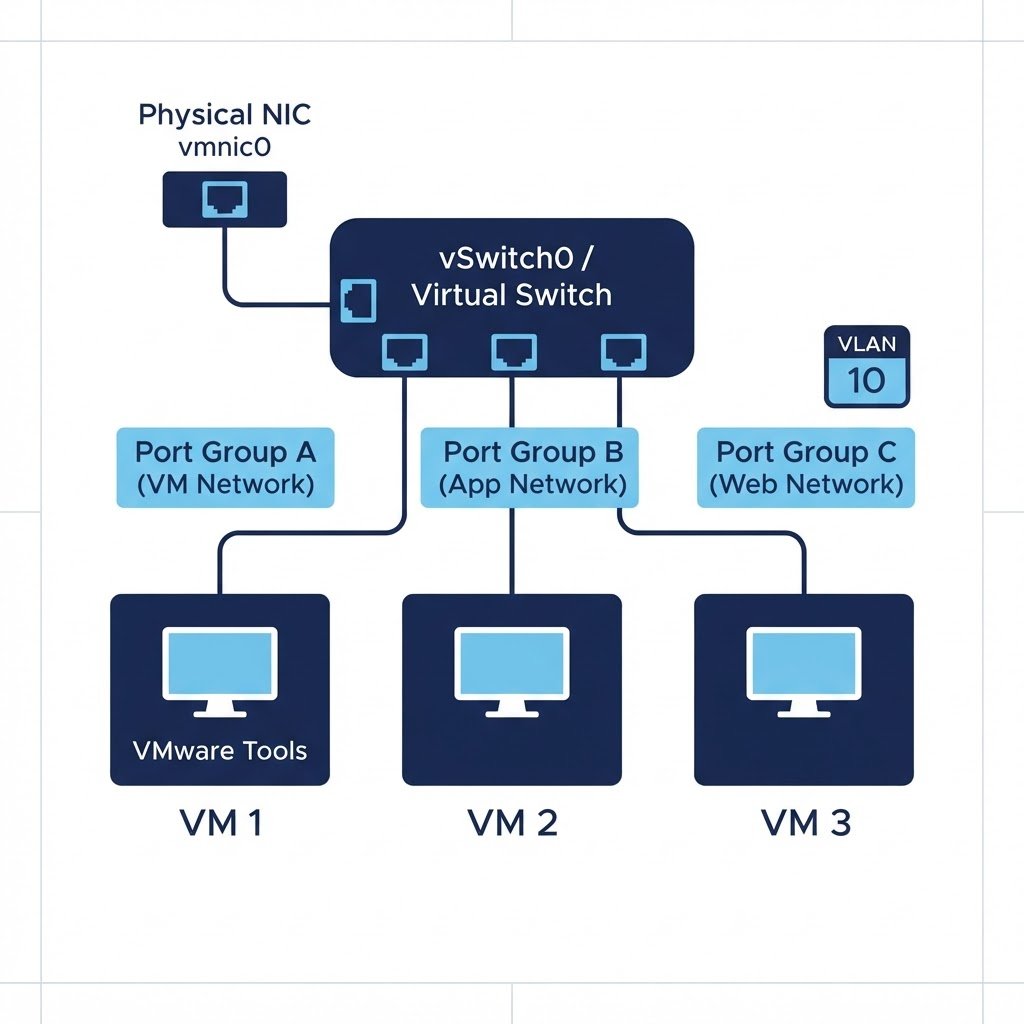
ESXi’s virtual networking connects virtual machines to each other and to the physical network. Understanding it is essential: almost every lab exercise — domain controllers, clusters, routers — depends on putting the right VMs on the right network.
dns LAB TOPOLOGY & PREREQUISITES
# example values used while writing and testing this guide
VSWITCH SPECS
PORT GROUPS
NIC POLICY
01constructionThe Three Building Blocks
- Standard Switch (vSwitch): a software switch inside the host, connected to physical NICs through uplinks
- Port group: a named network on the switch (a VLAN), that VMs attach to — for example
VM NetworkorLab-DMZ - VMkernel adapter: a special port used by the host itself for management, vMotion, iSCSI or vSphere traffic
02downloadManage Virtual Networks: Creating a Port Group
In the ESXi Host Client, open Networking → Port groups and add one: give it a name, pick the vSwitch it lives on, set the VLAN ID (0 for no tagging) and note which uplinks carry it. Attach VMs by editing the machine’s network adapter and choosing the port group. Once you manage virtual networks in ESXi with port groups, VLANs and teaming become routine.
03usbManaging the Management Network
The host’s own IP settings live under Networking → VMkernel adapters. Editing the management adapter lets you change the IP, gateway and DNS. If you lock yourself out with a bad change, use the DCUI on the console (Configure Management Network) to repair it.
04terminalTypical Lab Exercises
- Put two VMs on the same network and test connectivity with ping
- Connect a VM to the data network while keeping another adapter on a lab-only network
- Move a VM between networks by changing its port group and verifying the new DHCP lease
If a VM has no connectivity, check in order: the port group assignment, the vSwitch uplink status, the physical switch port, and firewall inside the guest OS.
Watch: How to Configure Networks in ESXi Server
Because some steps are easier to copy from video, this companion walkthrough mirrors the lab above. Also, the chapter pills follow the same order as the steps.
Q&AquizFrequently Asked Questions About Managing Virtual Networks in ESXi
What is the difference between a vSwitch and a port group?
The vSwitch is the virtual switch itself, while a port group is a named network on it. Think of the switch as the hardware and the port group as the wall socket you plug a VM into.
Why does a VMkernel adapter matter?
Because the host itself uses VMkernel adapters for management, vMotion and iSCSI. In contrast, VMs attach to ordinary port groups.
How do I isolate a lab network?
Create a port group with no active uplink, or a private port group with a VLAN ID nothing else uses. Consequently, only VMs on that port group can talk to each other.
Where does VLAN tagging happen?
Set the VLAN ID on the port group, and configure the physical switch to expect tagged traffic. If both sides disagree, the VM loses connectivity.
EXTopen_in_newExternal Resources
These official guides go deeper on managing virtual networks in ESXi.
Related Content
- How to Install ESXi Server
- How to Connect to ESXi Server from a Client Machine
- How to Build a Home Lab
Move VMs Between Networks
Port groups are in place, so the next lab moves VMs between them. Then re-pointing NICs becomes routine.