


AWS storage services come in four main flavors, and choosing the right one is easier once you see how they differ. For example, the same file can live in S3 as an object, on EBS as a disk block, or in Glacier as a long-term archive.
Storage is one of the first AWS service categories everyone learns, and it maps neatly onto the three classic types: object, block and file storage. Here are the AWS services that deliver each type and when to choose them.
dns LAB TOPOLOGY & PREREQUISITES
# example values used while writing and testing this guide
AWS ACCOUNT
LAB ENVIRONMENT
VALIDATION
01constructionAWS storage services: Amazon S3 — Object Storage
Amazon Simple Storage Service (S3) stores objects (files of any type) in containers called buckets. Files can be from 0 bytes up to 5 TB each, and you access them over HTTP from anywhere in the world. S3 is infinitely scalable, extremely durable (designed for 99.999999999% durability) and cheap for large volumes of data.
Typical uses: backups, static websites, media hosting, data lakes and application assets. See Hosting a Static Website in an Amazon S3 Bucket for a hands-on example.
02downloadAmazon EBS — Block Storage
Amazon Elastic Block Store (EBS) provides virtual hard disks (volumes) that you attach to one EC2 instance at a time, just like a physical drive. EBS volumes come in SSD types for fast boot volumes and databases, and HDD types for throughput-heavy work like big data processing. Volumes persist independently of the instance, and you can snapshot them to S3 for backup. In short, AWS storage services works best when you follow the order above and verify each step.
03usbAmazon EFS and FSx — File Storage
Amazon Elastic File System (EFS) is a managed NFS file system that can be mounted by many EC2 instances at the same time, growing and shrinking automatically. Use it for shared content, WordPress media folders and application data used by multiple servers. Amazon FSx provides managed Windows File Server (SMB) and Lustre file systems for Windows workloads and high-performance computing.
04terminalAmazon Glacier — Archival Storage
Amazon S3 Glacier classes (Glacier Instant Retrieval, Glacier Flexible Retrieval and Glacier Deep Archive) store archives for as little as about $1 per TB per month, with retrieval times from milliseconds (Instant Retrieval) to hours (Deep Archive). Use Glacier for compliance records and long-term backups you rarely touch.
05settings_ethernetWhich AWS Storage Service Should You Use?
| Service | Type | Best for |
|---|---|---|
| S3 | Object | Files accessed over the web, backups, static sites |
| EBS | Block | Boot disks and data disks for a single EC2 instance |
| EFS | File (NFS) | Shared folders mounted by many Linux servers |
| FSx | File (SMB/Lustre) | Windows shares, high-performance computing |
| Glacier | Object archive | Long-term, rarely accessed archives |
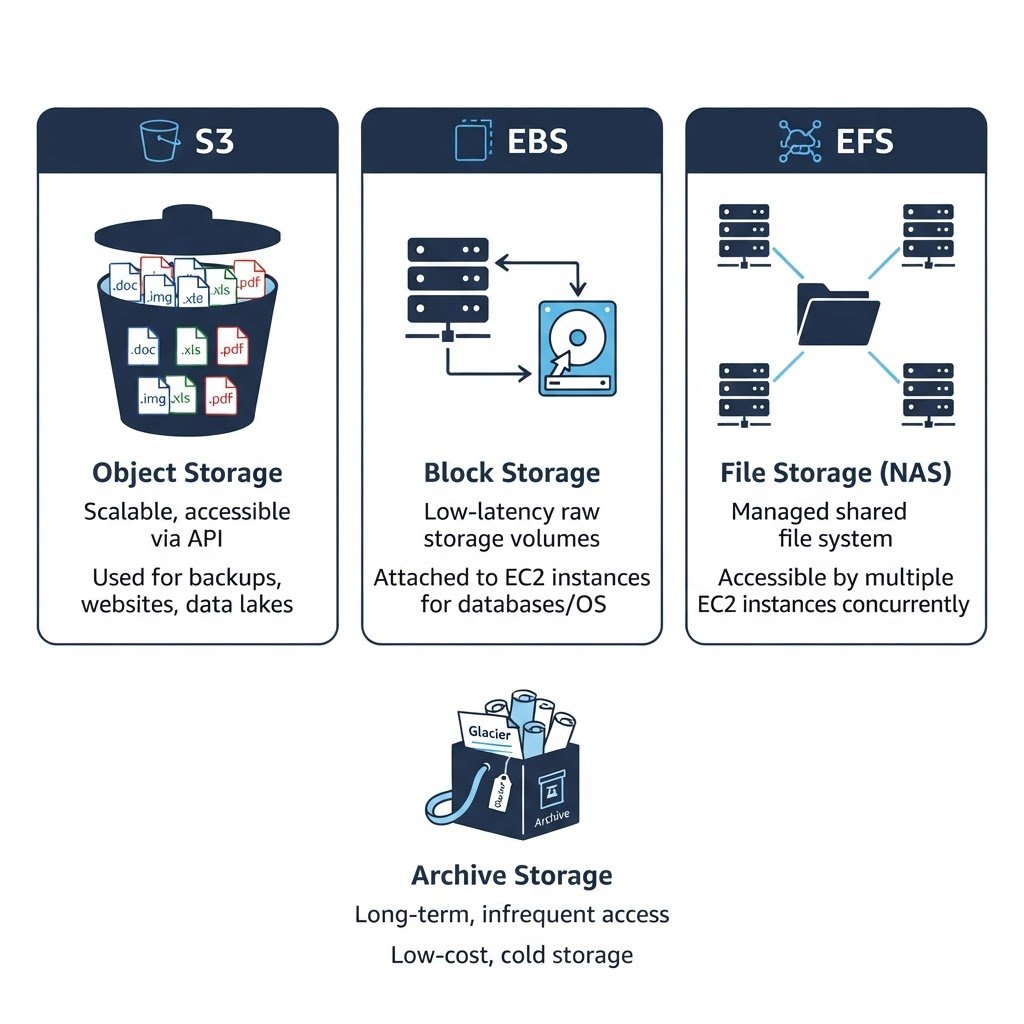 In short, AWS storage services works best when you follow the order above and verify each step.
Q&AquizFrequently Asked Questions About AWS Storage Services
What is the difference between S3 and EBS?
S3 stores objects you reach over the internet, while EBS behaves like a hard disk attached to one EC2 instance. Consequently, websites use S3 for files, but databases use EBS for fast block access.
When would I choose EFS?
Choose EFS when several servers need the same shared folder at the same time. For example, a cluster of web servers can all mount one EFS file system for uploaded images.
Is S3 free to try?
Yes, the Free Tier includes 5 GB of standard S3 storage for 12 months. Similarly, you can practice hosting a static website in S3 without paying anything.
What belongs in Glacier?
Anything you rarely read: old backups, compliance archives and completed project files. Retrieval is slower or costs more, so keep active data in S3 instead.
EXTopen_in_newExternal Resources
These official guides go deeper on AWS storage services.
Related Content
AWS Database Services Explained: RDS, DynamoDB, Aurora and More
Finish this lab, then continue down the track. Each guide builds on the one before it.